How to Build a Telegram Bot That Tracks XRP Ledger Transactions in Real Time
A hands-on guide to building a Node.js Telegram bot that watches the XRP Ledger in real time, covering wallet alerts, whale alerts, XRP price moves and safe deployment on a VPS.
On this page
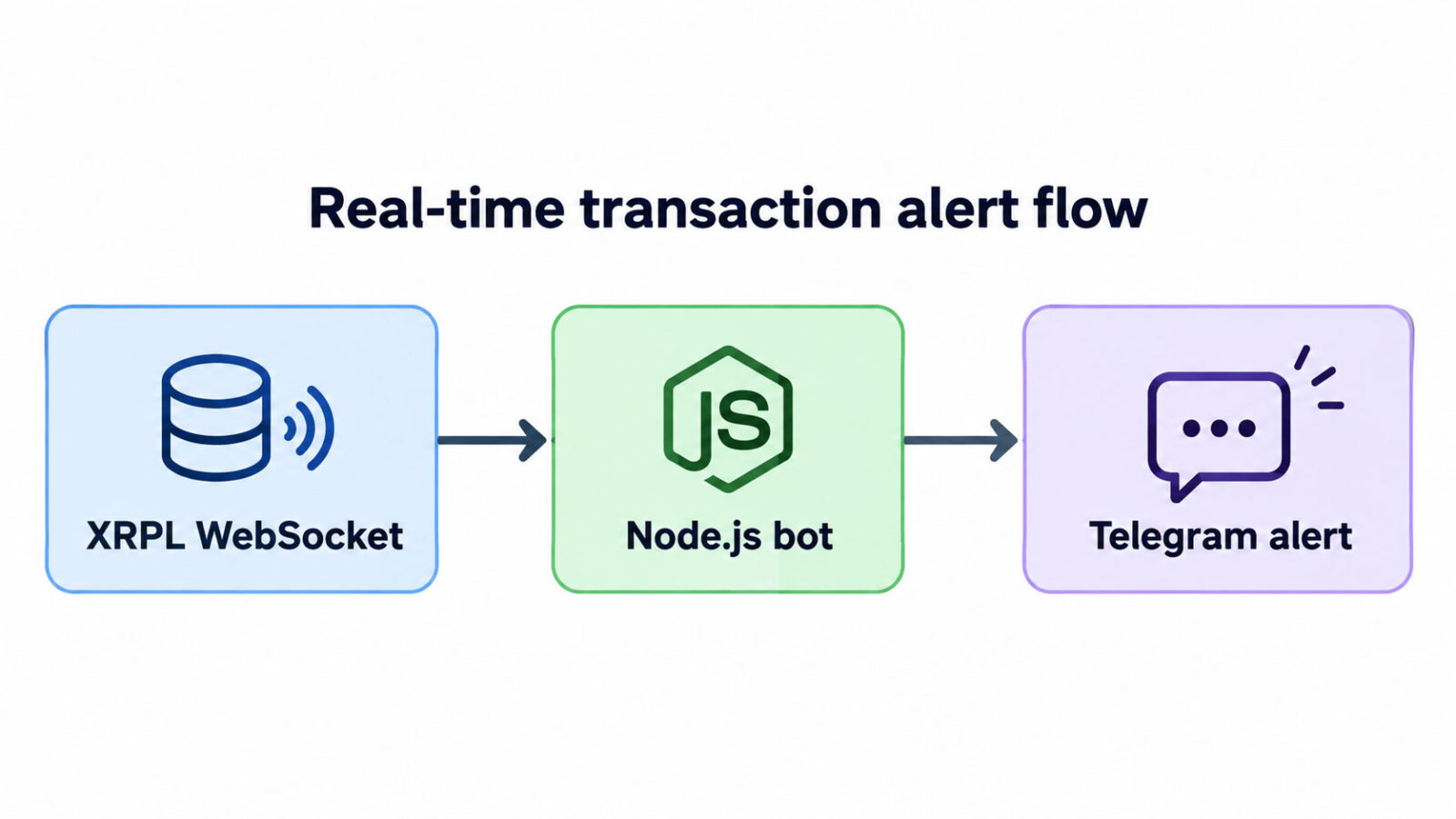
You can build a Telegram bot that tracks XRP Ledger transactions in real time with roughly 150 lines of Node.js. The bot subscribes to the ledger over a WebSocket with xrpl.js, keeps only the validated transactions you care about, and pushes a clean alert to your Telegram chat within seconds. This guide walks through the whole build step by step, updated for October 2026.
Why bother? Block explorers are great for looking things up, but they don’t tap you on the shoulder. When a wallet you watch receives a payment, or a huge XRP transfer moves across the ledger, you want to know right away, not the next time you remember to refresh a page. With XRP news breaking at all hours, a bot that watches the chain itself is the most reliable alert you can have.
I build Telegram bots and trading tools at HakimiTech, and this is the same pattern I start from for monitoring bots. By the end you’ll have a working bot that sends wallet alerts, optional whale alerts and optional XRP price-move alerts, running 24/7 on a VPS.
Key takeaways
- The XRP Ledger pushes validated transactions to you over WebSocket, so you don’t need to poll.
- Use
delivered_amount, neverAmount, to know how much was actually received. - Re-send your subscription every time the WebSocket reconnects, or alerts silently stop.
- Queue your Telegram messages to stay inside the Bot API rate limits.
- The bot is read-only: it never needs a wallet secret or private key.
What Is the XRP Ledger and Why Track It in Real Time?
The XRP Ledger (XRPL) is a public, decentralized blockchain whose native asset is XRP. New ledger versions close every few seconds, and any server can stream them to you live. That makes it ideal for real-time monitoring.
Tracking it in real time is useful when you need to react, not just look things up later. Common use cases I see:
- XRP wallet tracker: get notified the moment your own or a business wallet sends or receives funds.
- Payment confirmation: a shop or service gets a Telegram ping when a customer’s XRP payment is validated.
- Whale alerts: watch for unusually large XRP payments across the whole network.
- Trading context: combine on-chain activity with price-move alerts in one channel.
The key detail is the WebSocket subscribe method. You tell an XRPL server which accounts or streams you’re interested in, and it pushes every matching transaction to you as it happens.
What You Need Before You Start Tracking the XRP Ledger
To track the XRP Ledger from Telegram, you need four things: Node.js, a Telegram bot token, your chat ID, and an XRPL WebSocket endpoint. All of them are free to get.
- Node.js: a current LTS release. Anything from version 18 up includes the built-in
fetchthat the price alerts use. - A bot token: open Telegram, message
@BotFather, send/newbot, and copy the token it gives you. - Your chat ID: send any message to your new bot, then open
https://api.telegram.org/bot<TOKEN>/getUpdatesin a browser and copychat.id. For a channel, add the bot as an admin; channel IDs start with-100. - An XRPL WebSocket endpoint:
wss://xrplcluster.com/works for testing. The official public servers list notes that Ripple’s public servers aren’t meant for sustained or business use, so plan on your own node or a paid provider for production.
I’m using Node.js with xrpl.js and node-telegram-bot-api throughout. The same logic ports cleanly to Python with xrpl-py and python-telegram-bot if you prefer.
Step-by-Step: Building the XRP Ledger Telegram Bot
The bot is one file, index.js, built from seven numbered blocks. Paste each block in order and you’ll have the complete, working bot.
Step 1: Set up the project and the .env file
Create the project and install the three dependencies:
mkdir xrpl-telegram-bot && cd xrpl-telegram-bot npm init -y npm install xrpl node-telegram-bot-api dotenvThen create a .env file next to it. Every secret and setting lives here, never in your code:
# Telegram TELEGRAM_TOKEN=123456789:your-bot-token-here TELEGRAM_CHAT_ID=123456789 # XRP Ledger XRPL_WSS=wss://xrplcluster.com/ WATCH_ACCOUNTS=rYourFirstAddressHere,rYourSecondAddressHere # Optional features (covered later) WHALE_ALERTS=false WHALE_MIN_XRP=1000000 PRICE_ALERTS=false PRICE_MOVE_PCT=3 # 1100 ms for a private chat; use 3000+ for groups SEND_INTERVAL_MS=1100Step 2: Load and validate the configuration
Fail fast. If the token is missing or an address has a typo, the bot should refuse to start instead of silently watching nothing.
// index.js — XRP Ledger → Telegram real-time alert bot // Stack: Node.js + xrpl.js + node-telegram-bot-api require('dotenv').config(); const xrpl = require('xrpl'); const TelegramBot = require('node-telegram-bot-api'); // ---- 1. Configuration (all secrets live in .env) ---- const config = { token: process.env.TELEGRAM_TOKEN, chatId: process.env.TELEGRAM_CHAT_ID, wss: process.env.XRPL_WSS || 'wss://xrplcluster.com/', accounts: (process.env.WATCH_ACCOUNTS || '') .split(',') .map((a) => a.trim()) .filter(Boolean), whaleAlerts: process.env.WHALE_ALERTS === 'true', whaleMinXrp: Number(process.env.WHALE_MIN_XRP || 1000000), priceAlerts: process.env.PRICE_ALERTS === 'true', priceMovePct: Number(process.env.PRICE_MOVE_PCT || 3), sendIntervalMs: Number(process.env.SEND_INTERVAL_MS || 1100), }; if (!config.token || !config.chatId) { console.error('TELEGRAM_TOKEN and TELEGRAM_CHAT_ID are required in .env'); process.exit(1); } // Catch address typos before connecting const badAddresses = config.accounts.filter((a) => !xrpl.isValidClassicAddress(a)); if (badAddresses.length) { console.error('Invalid XRP Ledger addresses:', badAddresses.join(', ')); process.exit(1); }Step 3: Build a rate-limited Telegram sender
Telegram limits how fast bots can post. The Bots FAQ says to stay around one message per second in a single chat and no more than 20 per minute in a group. A tiny queue handles that for you.
// ---- 2. Telegram sender with a simple rate-limited queue ---- const bot = new TelegramBot(config.token, { polling: false }); // send-only bot const queue = []; let draining = false; const sleep = (ms) => new Promise((resolve) => setTimeout(resolve, ms)); function notify(html) { queue.push(html); if (!draining) drainQueue(); } async function drainQueue() { draining = true; while (queue.length) { const html = queue.shift(); try { await bot.sendMessage(config.chatId, html, { parse_mode: 'HTML' }); } catch (err) { // On 429, Telegram tells us how many seconds to wait const retryAfter = err.response?.body?.parameters?.retry_after; if (retryAfter) { queue.unshift(html); // put it back and try again later await sleep(retryAfter * 1000); continue; } console.error('Telegram send failed:', err.message); } await sleep(config.sendIntervalMs); } draining = false; }Step 4: Format transactions into readable alerts
Raw ledger JSON isn’t something you want on your phone. Two details matter here. XRP amounts arrive as strings in drops (1 XRP = 1,000,000 drops), while issued tokens arrive as objects. And any text going into Telegram’s HTML mode must be escaped.
// ---- 3. Formatting helpers ---- const escapeHtml = (s) => String(s).replace(/&/g, '&').replace(/</g, '<').replace(/>/g, '>'); // XRP = string in drops; issued tokens = { currency, issuer, value } function formatAmount(amount) { if (amount === undefined || amount === 'unavailable') return 'unknown'; if (typeof amount === 'string') { return `${Number(xrpl.dropsToXrp(amount)).toLocaleString('en-US')} XRP`; } return `${amount.value} ${amount.currency}`; } const shortAddr = (a) => (a ? `${a.slice(0, 6)}…${a.slice(-4)}` : '?'); const txLink = (hash) => `https://livenet.xrpl.org/transactions/${hash}`; function formatTx(tx, meta, hash, title) { const lines = [ `<b>${escapeHtml(title)}</b>`, `Type: ${escapeHtml(tx.TransactionType)}`, `From: <code>${escapeHtml(shortAddr(tx.Account))}</code>`, ]; if (tx.Destination) { lines.push(`To: <code>${escapeHtml(shortAddr(tx.Destination))}</code>`); } // delivered_amount = what actually arrived (safe against partial payments) if (meta.delivered_amount !== undefined) { lines.push(`Delivered: ${escapeHtml(formatAmount(meta.delivered_amount))}`); } lines.push(`<a href="${txLink(hash)}">View on explorer</a>`); return lines.join('\n'); }Step 5: Handle the transaction stream
This is the heart of the bot. Every event is checked for validation and success, de-duplicated, and then routed to a wallet alert or a whale alert.
The first thing that bit me on the XRP Ledger was the Amount field. A payment with the partial-payment flag can show a large Amount while delivering far less, which the official partial payments docs explain in detail. Always read meta.delivered_amount.
// ---- 4. Handle every validated transaction from the stream ---- const seen = new Set(); // one tx can arrive via more than one stream function onTransaction(event) { if (!event.validated) return; // ignore anything not final yet // API v2 names the tx "tx_json"; API v1 used "transaction" const tx = event.tx_json || event.transaction; const meta = event.meta; const hash = event.hash || tx?.hash; if (!tx || !meta || !hash || seen.has(hash)) return; seen.add(hash); if (seen.size > 5000) seen.clear(); // keep memory bounded if (meta.TransactionResult !== 'tesSUCCESS') return; // a) Watched wallets: incoming or outgoing const watched = config.accounts.find((a) => a === tx.Account || a === tx.Destination); if (watched) { const direction = tx.Account === watched ? 'Outgoing' : 'Incoming'; notify(formatTx(tx, meta, hash, `${direction} · ${shortAddr(watched)}`)); return; } // b) Whale alerts: large XRP payments anywhere on the ledger if ( config.whaleAlerts && tx.TransactionType === 'Payment' && typeof meta.delivered_amount === 'string' ) { const xrp = Number(xrpl.dropsToXrp(meta.delivered_amount)); if (xrp >= config.whaleMinXrp) { notify(formatTx(tx, meta, hash, '🐋 Whale alert')); } } }Step 6: Connect to an XRP Ledger WebSocket and subscribe
Now connect to the XRP Ledger and send the subscription. The one rule that matters: send it on every connect, not just the first. A reconnected socket starts with no subscriptions, and without this the bot looks healthy while sending nothing.
// ---- 5. Connect to the XRP Ledger and subscribe ---- const client = new xrpl.Client(config.wss); async function subscribe() { const request = { command: 'subscribe' }; if (config.accounts.length) request.accounts = config.accounts; if (config.whaleAlerts) request.streams = ['transactions']; if (!request.accounts && !request.streams) { console.warn('Nothing to watch: set WATCH_ACCOUNTS or WHALE_ALERTS=true'); return; } await client.request(request); console.log('Subscribed:', JSON.stringify(request)); } client.on('transaction', onTransaction); // Runs on the first connect AND on every reconnect client.on('connected', () => { subscribe().catch((err) => console.error('Subscribe failed:', err.message)); }); client.on('disconnected', (code) => console.warn('XRPL disconnected, code', code)); client.on('error', (...args) => console.error('XRPL error:', ...args));Step 7: Start the bot and test it
The last block starts everything and shuts down cleanly. Block 6 (price alerts) comes in the next section. Until you add it, keep PRICE_ALERTS=false.
// ---- 7. Start ---- (async () => { await client.connect(); // the "connected" handler sends the subscription if (config.priceAlerts) { checkPrice(); setInterval(checkPrice, 5 * 60 * 1000); // every 5 minutes } notify('✅ XRPL alert bot is online'); })(); async function shutdown() { await client.disconnect(); process.exit(0); } process.on('SIGINT', shutdown); process.on('SIGTERM', shutdown);Run node index.js. You should get the “online” message in Telegram right away. To test, send a small amount of XRP to or from a watched wallet. The alert usually lands within a few seconds of the transaction being validated.
Adding XRP Ledger Whale Alerts and XRP News/Price Notifications
Whale alerts are already in the code; you just switch them on. Price alerts take one more block. Together they turn the bot into a small market dashboard inside Telegram.
Turning on whale alerts
Set WHALE_ALERTS=true and choose a threshold with WHALE_MIN_XRP. The bot then subscribes to the full transactions stream and alerts on any XRP payment at or above that size.
Be aware of the trade-off. The full stream is every validated transaction on the XRP Ledger, so your server processes far more data than with wallet-only tracking. A small VPS handles it fine, but set the threshold high enough that your chat doesn’t turn into noise. I usually start high and lower it gradually.
XRP price-move alerts
Insert this block between block 5 and block 7. It checks the XRP price every five minutes using CoinGecko’s free public endpoint and alerts when the price moves by more than PRICE_MOVE_PCT from the last alert.
// ---- 6. Optional: XRP price-move alerts ---- let referencePrice = null; async function checkPrice() { try { const res = await fetch( 'https://api.coingecko.com/api/v3/simple/price?ids=ripple&vs_currencies=usd' ); if (!res.ok) throw new Error(`HTTP ${res.status}`); const price = (await res.json())?.ripple?.usd; if (typeof price !== 'number') return; if (referencePrice === null) { referencePrice = price; // first reading sets the baseline return; } const change = ((price - referencePrice) / referencePrice) * 100; if (Math.abs(change) >= config.priceMovePct) { const arrow = change > 0 ? '📈' : '📉'; notify( `${arrow} <b>XRP price move</b>\n$${referencePrice} → $${price} (${change.toFixed(2)}%)` ); referencePrice = price; // next alert is measured from here } } catch (err) { console.error('Price check failed:', err.message); } }Free price APIs have their own rate limits, so don’t drop the interval to a few seconds. For anything business-critical, use a paid data provider with a clear SLA.
Risk note: price and whale alerts are information, not trading signals. A large transfer can be an exchange moving its own funds, and crypto prices are volatile. Never trade on an alert alone, and never risk money you can’t afford to lose.

What about XRP news headlines?
The same notify() function can post XRP news from any source you trust. The simplest approach is to poll an RSS feed, remember which item links you’ve already sent, and push new headlines through the queue. Pick sources carefully: a bot that forwards rumors fast is worse than no bot.
Deploying Your XRP Ledger Bot on a VPS (PM2 or systemd)
For 24/7 alerts, run the bot on a small Linux VPS under a process manager that restarts it on crashes and reboots. PM2 is the quickest; systemd needs nothing extra installed.
Option A: PM2
npm install -g pm2 pm2 start index.js --name xrpl-bot pm2 save pm2 startup # prints a command; run it once to start on boot pm2 logs xrpl-botOption B: systemd
Save this as /etc/systemd/system/xrpl-bot.service, then run sudo systemctl enable --now xrpl-bot:
[Unit] Description=XRPL Telegram alert bot After=network-online.target Wants=network-online.target [Service] Type=simple User=xrplbot WorkingDirectory=/opt/xrpl-telegram-bot ExecStart=/usr/bin/node index.js Restart=always RestartSec=5 [Install] WantedBy=multi-user.targetSecurity checklist
- Keep the token in
.env, add.envto.gitignore, and runchmod 600 .env. - If the token ever leaks, revoke it in
@BotFatherand generate a new one. - Run the bot as a dedicated non-root user, like
xrplbotabove. - The bot only reads the XRP Ledger. It never needs a wallet seed or private key, so never put one on the server.
- For production, use your own XRPL node or a paid endpoint instead of free public servers.
Common XRP Ledger Bot Errors and How to Fix Them
Most problems come from five places: the chat ID, the subscription, amounts, HTML escaping and rate limits. Here’s how I diagnose them quickly.
| Symptom | Likely cause | Fix |
|---|---|---|
| “Bad Request: chat not found” | Wrong chat ID, or you never messaged the bot | Send /start to the bot, then re-check getUpdates. Channel IDs start with -100. |
| Bot is online but sends no alerts | Wrong network or address | Make sure the endpoint is Mainnet, not Testnet, and the address is correct. |
| Alerts stop after a few hours | Socket reconnected without resubscribing | Subscribe inside the connected handler, as in block 5. |
| Amounts look a million times too big | Showing drops, not XRP | Convert with xrpl.dropsToXrp(). |
| Amount shown is higher than what arrived | Partial payment | Read meta.delivered_amount, never Amount. |
| “can’t parse entities” | Unescaped < or & in HTML mode |
Pass dynamic text through escapeHtml(). |
| 429 “Too Many Requests” | Sending too fast | Use the queue and raise SEND_INTERVAL_MS for groups. |
| Duplicate alerts | Same transaction via two streams | De-duplicate by hash, as in block 4. |
FAQ
Is it free to build a Telegram bot for the XRP Ledger?
Yes. The Telegram Bot API, xrpl.js and public XRPL servers are free to use. Your only real cost is a small VPS to run it 24/7, plus your own node or a paid endpoint if you go into production.
Can one bot track multiple XRP wallets?
Yes. Add the addresses to WATCH_ACCOUNTS separated by commas. One subscription request covers all of them, and each alert shows which wallet it relates to.
Do I need to run my own XRP Ledger node?
Not for testing or personal use. For sustained or business use, the official docs advise against relying on Ripple’s public servers, so run your own node or use a provider you trust.
Is the bot safe? Does it need my private key?
It never needs a private key or seed. It only reads public XRP Ledger data and sends Telegram messages. The only secret is the bot token, which you keep in .env.
Should I use Python or Node.js?
Both work well. xrpl.js and xrpl-py are both official XRPL libraries. Choose the language you’ll maintain most comfortably; the subscription logic is the same in either.
Wrapping Up
You now have a real-time XRP Ledger monitor in your pocket: wallet alerts, optional whale and price alerts, a rate-limited sender and a deployment that survives reboots. From here you can add commands like /watch and /unwatch, per-user subscriptions, or a database of alert history.
If you need something beyond a starter bot, such as a multi-user alert service or a full trading tool, take a look at my Telegram bot development services and trading software packages, or browse past projects. Need a custom Telegram bot or trading system? Get in touch with HakimiTech and tell me what you want to build.

Comments (0)
No comments yet — questions and feedback are welcome.